




Our Clients

Country and VPN blocking, content protection, cookie consent, and more - designed to keep your site clean, compliant, and protected from suspicious traffic.
Secure. Simple. Immediate.
Go Ahead, Try It.
No gimmicks. This is the exact Site Shield dashboard you'll use to protect your Wix website from spam bots, scammers from different countries, and VPN traffic. Try it out and see how it works in real time.
Try Me
Site Shield FAQ
Site Shield is built to protect your Wix website from spam bots, scammers from different countries, and VPN traffic. Learn more with our guided questions and answers.
What's the difference between IP blocking and whitelisting?
IP blocking prevents specific IPs from accessing your site. IP whitelisting allows specific IPs to bypass all other restrictions (useful for your team or partners).
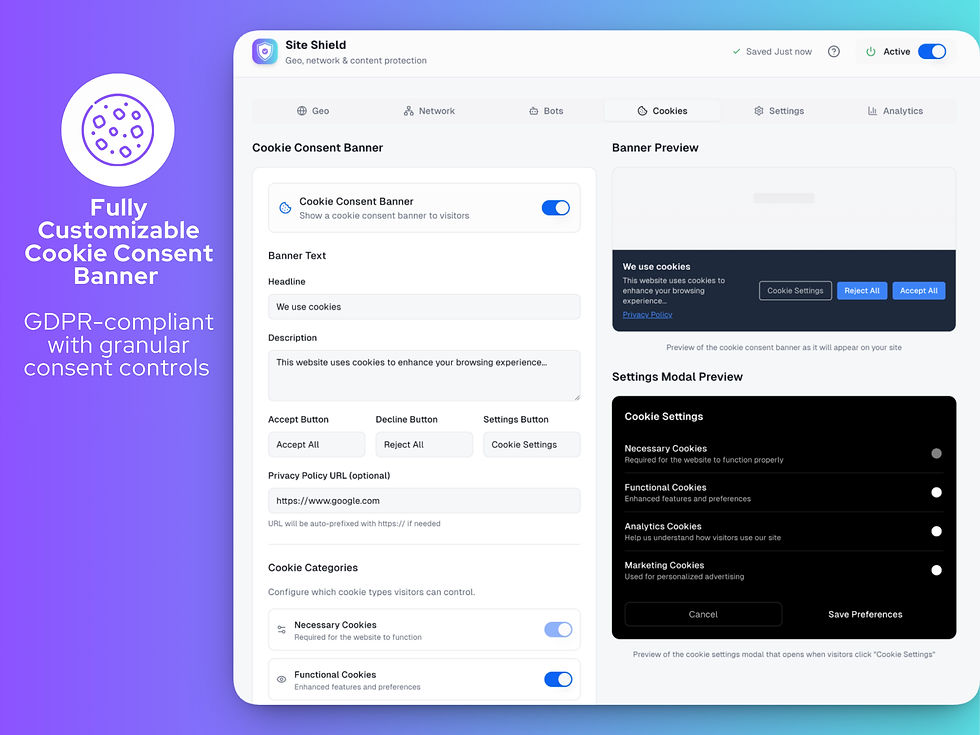
Is the cookie banner GDPR compliant?
Yes! The banner supports granular consent for different cookie categories (necessary, functional, analytics, marketing) and remembers user preferences.
What data is tracked?
Site Shield tracks block events including the block type (geo, VPN, IP, ISP), country of origin, ISP name, and timestamp. This data helps you understand your site's traffic patterns and security posture.
How does country blocking work?
Site Shield detects visitors' locations using their IP address and blocks access if they're from a country you've selected. Blocked visitors see a customizable message or are redirected to a URL of your choice.
What is a VPN and why block it?
VPNs (Virtual Private Networks) allow users to hide their real location by routing traffic through servers in different countries. Common services include NordVPN, ExpressVPN, and Surfshark. Blocking VPNs helps enforce geo-restrictions, prevent fraud, ensure content licensing compliance, and maintain accurate analytics.
What verification methods are available?
Three methods: Button confirmation (simple yes/no), Date of Birth entry (calculates age), and Checkbox confirmation (terms acceptance style).
How do I enable Site Shield protection?
Download Site Shield from the Wix App Marketplace:
https://wix.to/ZAf245x
Simply toggle the "Active" switch in the top right corner of your dashboard. When active, all your configured protections will be enforced on your site.
Do I need to add any code to my Wix site?
No! Site Shield automatically integrates with your Wix site. Once installed and configured, protection is applied without any additional code.
How long is analytics data retained?
Analytics data is stored indefinitely, allowing you to review historical blocking patterns and trends at any time.
Can I block IP ranges?
Yes! You can block IP ranges using CIDR notation. For example, entering 192.168.1.0/24 will block all IPs from 192.168.1.0 to 192.168.1.255.
Can I block multiple countries at once?
Yes! You can select as many countries as you need. Use the search feature to quickly find and toggle countries on or off.
Is age verification legally binding?
Age verification gates are a good faith effort but don't guarantee actual age. For regulated industries, consult legal counsel about compliance requirements.
What is a Proxy and why block it?
Proxies are intermediate servers that forward web requests on behalf of users, masking their real IP address. Unlike VPNs, proxies typically don't encrypt traffic. They're often used to bypass geo-restrictions or hide identity. Blocking proxies prevents users from circumventing your country restrictions.
What is the "Do Not Sell" option?
This is for CCPA (California) compliance. It allows California residents to opt out of the sale of their personal information.
Do I need to publish my site for Site Shield to work?
You only need to publish your Wix site once after installing Site Shield. After that initial publish, any settings changes you make will take effect automatically without needing to republish.
What is TOR and why block it?
TOR (The Onion Router) is a privacy network that routes traffic through multiple encrypted layers, making it nearly impossible to trace. It's commonly used for maximum anonymity via the TOR Browser. Note: TOR blocking does NOT affect incognito/private browsing—those users still appear with their normal IP address.
What happens if someone fails verification?
They see a customizable "access denied" message. You can configure both the headline and description for denied visitors.
What happens when someone is blocked?
Depending on your settings, blocked visitors either see a custom block message or are redirected to a URL you specify. You can customize the message text and colors.
How do I find an IP address to block?
You can find IP addresses from your server logs, security tools, or reports of abusive behavior. Once you have the IP, simply add it to your block list in the IP Blocking section.
Can visitors change their cookie preferences later?
Yes! You can add a "Cookie Settings" button anywhere on your site. Clicking it reopens the consent modal for visitors to update their preferences.
How quickly do my settings take effect?
Settings are saved automatically and typically take effect within a few seconds after publishing. You'll see a "Saved" confirmation in the header.
What's the difference between VPN, Proxy, and TOR?
VPNs encrypt all traffic and mask your IP through a single server. Proxies route traffic without encryption. TOR uses multiple encrypted relays for maximum anonymity. Each requires different software and provides different levels of privacy. All three can bypass geo-restrictions if not blocked.
Can VPN users bypass my geo-blocking?
Without VPN blocking enabled, yes. Users could use a VPN to appear from an allowed country. Enabling VPN protection prevents this bypass.